



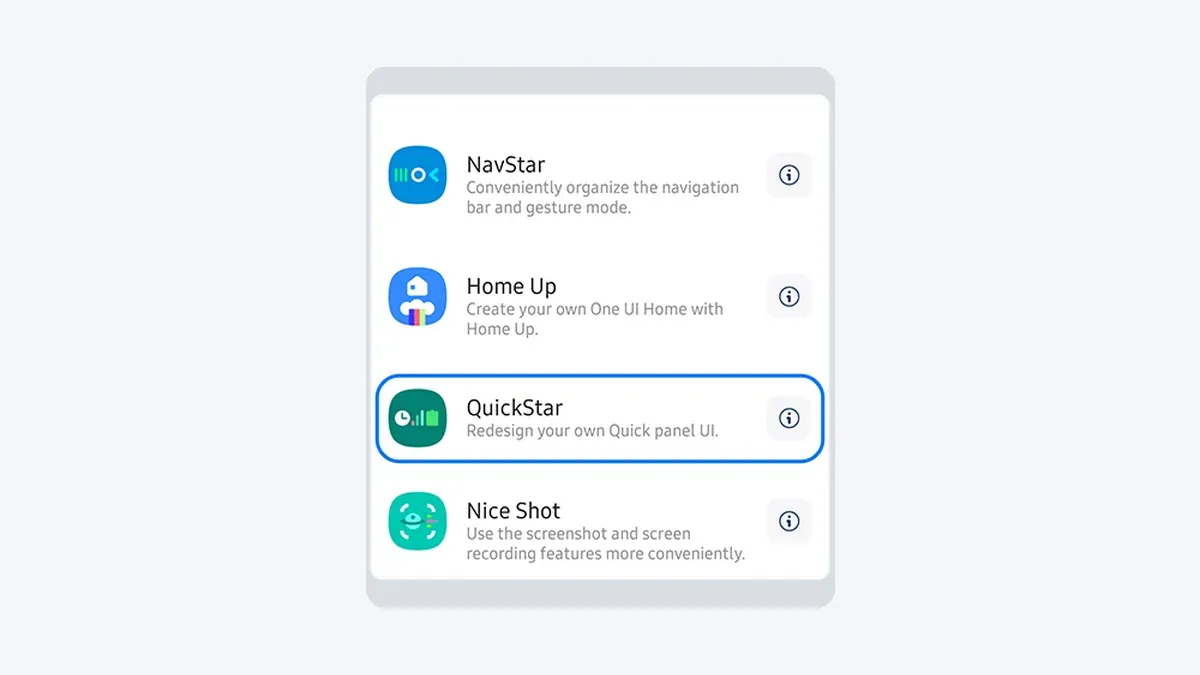
Samsung's Good Lock suite has always been a playground for customization enthusiasts, and with One UI 8.5, the Home Up module is reaching new heights. Samsung has been testing One UI 8.5 for the Galaxy S25 for over a month now, according to Android Police, and the results are impressive. The latest improvements transform how users interact with their Galaxy devices, offering unprecedented control over home screen animations and layout customization. This isn't just another incremental update—it's a comprehensive overhaul that makes Samsung's customization tools more powerful and accessible than ever before.
What makes Home Up's One UI 8.5 upgrade so special?
The Home Up module has undergone significant enhancements that extend far beyond basic tweaks. Samsung provided the module with substantial improvements in One UI 8, as reported by Android Police, including deep integration with the One UI Launcher that enables customization through long-press gestures on app icons. This system-level integration eliminates the need to jump between multiple apps when tweaking your home screen setup.
The DIY Home Screen feature showcases the most compelling improvements. The latest version introduces alignment guide lines, making it easier to position icons, widgets, and stickers with precision, according to the same source. Think of it like having invisible grids that snap your elements into perfect alignment—a feature professional designers rely on for polished layouts. The floating repositioning button gives users precise control over icon and widget placement, delivering the kind of granular control typically found in premium third-party launchers.
Users can now hide page indicators completely and enjoy horizontal scrolling in the app drawer when using alphabetical ordering. This horizontal scroll mode transforms how you navigate large app collections, making it feel more like browsing through a desktop environment rather than the traditional vertical list approach.
Lock screen animations get a major boost
One UI 8.5 brings revolutionary changes to lock screen customization through the updated Lock Star module. The latest release introduces unlock animation effects that allow users to modify how their Galaxy phone transitions from locked to unlocked states, reports Android Police.
You can now adjust animation type, timing, shape, and linearity to create a truly personalized unlocking experience. This level of granular control means you could set up a quick, snappy unlock for work scenarios or a slower, more elegant animation for personal use. While most users may not care about these detailed animation tweaks, those who love personalizing every aspect of their Galaxy phone now have even more control, notes Android Police.
The update also provides manual control over Always-On Display brightness on compatible models, according to the same report. Unlike automatic mode which keeps the display relatively bright, you can now set lower brightness levels manually—particularly useful for those late-night phone checks when you want to preserve your night vision.
Enhanced integration and accessibility features
Samsung has made Home Up more accessible by integrating many of its features directly into system settings, notes SammyGuru. This integration represents a fundamental shift in Samsung's approach—instead of forcing users to remember which Good Lock module controls which feature, common customizations now appear contextually within the standard settings interface.
Edge panel functionality has also been expanded significantly. Users can now open apps directly in split screen or pop-up view from the Edge panel, according to Android Police. This enhancement transforms the Edge panel from a simple app launcher into a multitasking command center, streamlining workflows for power users who regularly juggle multiple apps.
The Home Up module continues to be one of the most popular tools in Samsung's Good Lock suite, according to SammyGuru, offering comprehensive control over home screen settings, animations, gestures, and more UI elements. Version 17.0.00.48 demonstrates Samsung's commitment to maintaining this popularity through meaningful feature additions rather than superficial changes.
Availability and compatibility considerations
Currently, these enhanced Home Up features are exclusive to One UI 8.5, which is only available to Galaxy S25 series users enrolled in the beta program, reports Android Police. This beta limitation means most Galaxy users will need to wait for the broader rollout to experience these improvements.
While you can install the latest Lock Star release on devices running One UI 8, the new animation and brightness control options won't appear unless you're running One UI 8.5. The update is available through the Galaxy Store, though users can sideload the APK manually if it doesn't appear automatically, according to the same source.
Samsung plans to focus heavily on Good Lock module upgrades throughout the One UI 8.5 rollout. Camera Assistant has already received granular controls and minimum shutter speed settings, indicating this comprehensive approach to customization extends well beyond just home screen enhancements. This systematic upgrade strategy suggests Samsung is treating One UI 8.5 as a customization renaissance rather than just another incremental update.
The bigger picture for Galaxy customization
Samsung's commitment to enhancing Good Lock demonstrates the company's understanding that customization enthusiasts drive much of the Galaxy ecosystem's appeal. These improvements signal Samsung's dedication to maintaining its position as the Android manufacturer that gives users the most control over their device experience.
The Home Up module's evolution reflects Samsung's broader strategy of making powerful tools more accessible without sacrificing depth. By integrating features into system settings while maintaining advanced options in Good Lock modules, Samsung addresses both casual customizers and power users. This dual approach ensures that someone tweaking their first home screen layout gets guidance, while seasoned Good Lock veterans can still dive into granular animation timing controls.
As One UI 8.5 prepares for wider release alongside future Galaxy devices, these enhancements position Samsung's customization ecosystem ahead of competitors who often treat personalization as an afterthought. Bottom line: these updates transform Home Up from a niche customization tool into something that feels essential for anyone who wants their Galaxy phone to truly reflect their personal style and workflow preferences.




Comments
Be the first, drop a comment!