



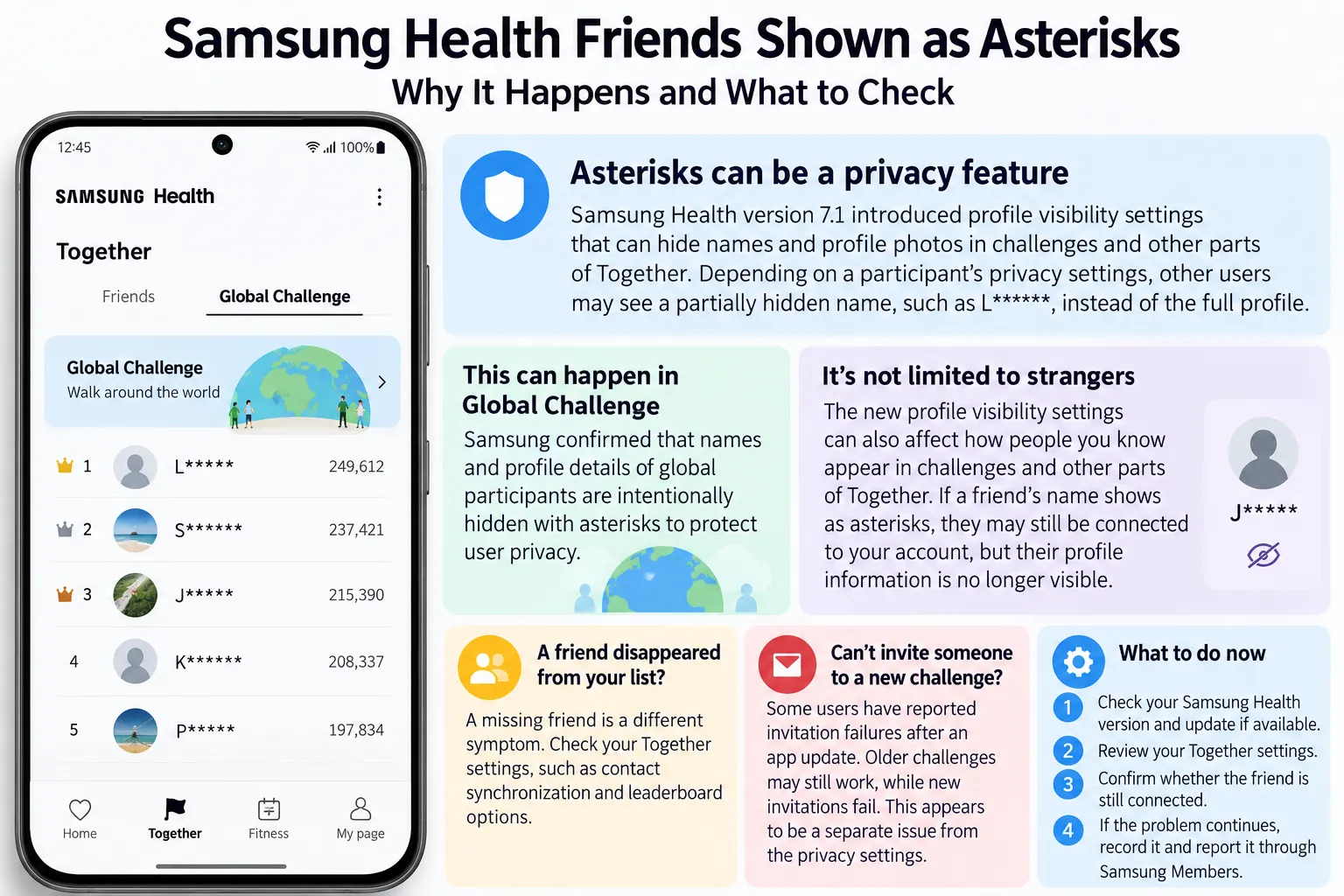
Open the Together tab in Samsung Health and spot a string of asterisks where a friend's name should be, and the first thought is usually that something broke. But Samsung Health friends shown as asterisks can be the result of a privacy feature introduced in version 7.1, rather than a glitch or missing contact.
The update introduced profile visibility settings that can hide names and profile photos in challenges and other parts of Samsung Health. Depending on a participant's privacy settings, other users may see a partially hidden name, such as L*****, instead of the full profile.
According to Android Authority's Oct. 7 report, a Samsung Health Service Operations representative explained that version 7.1 introduced the visibility controls to protect users' information.
That explanation doesn't cover every Together problem, though. Separate reports describe friends disappearing from lists and invitation failures when creating challenges. Those symptoms need to be distinguished from intentional profile masking before attempting a fix.
Why Samsung Health Together asterisk names appear in Global Challenge
The clearest example comes from a Samsung Community discussion about Global Challenge.
A user reported seeing names and profile photos disappear from the rankings, with names displayed as a first letter followed by asterisks.
A community contributor responded that Samsung Health intentionally hides names and profile details of other global participants to protect user privacy.
That explanation matches the broader profile visibility changes introduced in Samsung Health 7.1.
According to the Samsung Health Service Operations explanation reported by Android Authority, names can appear as asterisks depending on the individual's visibility settings. Profile photos may also be hidden.
The behavior isn't necessarily limited to strangers in Global Challenge rankings. The new privacy settings can affect how people appear in challenges and other parts of the Together experience.
That means seeing asterisks beside someone you recognize doesn't automatically mean the person was removed from your friends list.
It may simply mean their profile information is no longer visible to you under the current privacy settings.
What the Global Challenge explanation leaves unanswered
The privacy update provides a clear reason for masked names, but it doesn't establish that every instance of missing information has the same cause.
For example, a friend who appears as asterisks may still be connected to your account. A friend who disappears from the Friends list entirely presents a different symptom.
Samsung's official Together support guide documents several privacy and friend-management settings.
To review them:
Open Samsung Health on your phone.
Tap the More options menu, represented by three vertical dots.
Select Settings.
Open the Together section.
Review the available privacy and friend-management controls.
Samsung documents settings including Who can see my step count, Auto add new friends to leaderboard, Keep contacts synced, and Receive challenges from.
These options affect activity visibility, contact synchronization, and challenge participation.
However, changing step-count visibility or contact synchronization isn't a confirmed way to reveal another person's masked name.
Android Authority reports that version 7.1 introduced additional profile visibility settings within Together. The exact options available may vary by app version, region, or account.
If someone you know appears with asterisks, ask them to review their profile visibility settings rather than immediately removing and re-adding the connection.
Samsung Health friends disappeared: a missing list and a separate invite bug
Not every problem involving Samsung Health friends comes from profile masking.
A separate Samsung Members Korea discussion described friends disappearing from a user's list. The thread was marked resolved, but that status alone doesn't establish what caused the disappearance or whether all missing connections were restored.
A different series of Samsung Members Korea reports describes an invitation failure affecting newly created Together Challenges.
The user reported that invitations stopped working following a Samsung Health update, while older challenges continued displaying friends normally.
Samsung support initially couldn't reproduce the behavior but subsequently acknowledged the reported issue after reviewing submitted evidence and indicated that a correction was being worked on.
The problem continued to generate follow-up complaints.
In a Sept. 23 post, the same user said the invitation failure had remained unresolved for approximately 10 weeks since the original July 14 report.
That later complaint is important because it shows the issue hadn't been resolved for that user by September, despite earlier responses indicating that a fix was planned.
However, neither the original report nor the follow-ups establish how many accounts are affected, whether the behavior occurs outside Korea, or whether a subsequent release has fully corrected it.
The invitation problem also hasn't been linked to Samsung Health's profile visibility changes.
A missing friend, a failed invitation, and a masked name are three different symptoms. Treating them as one issue can lead to unnecessary troubleshooting.
How to identify the screen and symptom
Start by identifying exactly where the problem appears.
Asterisks on names in Global Challenge
If names are partially hidden in the Global Challenge ranking, this matches the privacy-masking behavior described in Samsung Community discussions.
Check whether participants remain visible in the leaderboard and whether the only change is how their names or profile photos appear.
Asterisks beside someone you personally added
This may also relate to Samsung Health 7.1's profile visibility settings.
The masked name alone doesn't establish that the person was removed. Check whether you can still see the connection or participate in an existing challenge together.
If possible, ask the person to review their profile visibility settings.
A friend disappears from your Friends list
This is different from a name appearing as asterisks.
Samsung's Together settings include contact synchronization and leaderboard options that can affect how friends appear.
Check those settings before assuming a connection has been permanently deleted. However, changing them isn't a confirmed fix for every missing-friend report.
You can't invite a known contact to a new challenge
This resembles the invitation problem reported through Samsung Members Korea.
If existing challenges still display friends correctly but new invitations fail, note that distinction when reporting the issue.
Older challenges work, but newer ones don't
That pattern appeared in the Korean invitation reports. It may help Samsung support identify the problem, although one user's experience doesn't establish a universal cause.
A few questions can narrow things down further:
Is the affected screen Global Challenge, a private Together Challenge, or the main Friends list?
Are names hidden behind asterisks, or are contacts missing entirely?
Can you still view an existing challenge involving the affected friend?
Can you search for and invite the person to a new challenge?
Which Samsung Health version is installed, and when did the symptom begin?
These details are more useful for troubleshooting than assuming every unusual name display is a software defect.
What to do now
If asterisks appear beside participants in Global Challenge, no troubleshooting is necessarily required. The behavior matches Samsung Health's documented privacy changes.
If someone you know appears with a masked name, check whether the friendship and challenge functions still work. Review your Together settings and, if appropriate, ask the other person to check their profile visibility preferences.
For missing friends or failed invitations, start with non-destructive checks:
Confirm your Samsung Health version. Open the app's settings or its store listing to check the installed version and whether an update is available.
Review Together settings. Check contact synchronization, leaderboard inclusion, and relevant privacy options without changing unrelated settings.
Compare old and new challenges. If invitations fail only in newly created challenges, record that distinction.
Update the app if a newer version is available. Installing an update is reasonable, but no confirmed release has been identified here as fixing the reported invitation failure.
Document the symptom and report it. Include the affected screen, app version, approximate start date, and a screenshot or screen recording if possible.
Samsung provides official instructions for reporting Samsung Health errors.
In Samsung Health, open the menu, select Settings, then Contact us and Error reports where those options are available.
You can also submit a report through Samsung Members. Samsung allows users to attach screenshots or recordings and include system logs to help investigate the issue.
Avoid deleting Samsung Health app data, factory-resetting your phone, or removing and re-adding friends simply because their names appear as asterisks.
For Global Challenge participants, the masked names are consistent with a privacy feature. For genuinely missing connections or failed invitations, record the specific behavior and report it separately.
The important distinction is whether Samsung Health is hiding someone's identity, losing a connection, or failing to send an invitation. Only the latter two suggest a problem that may require troubleshooting or a software fix.











Comments
Be the first, drop a comment!