





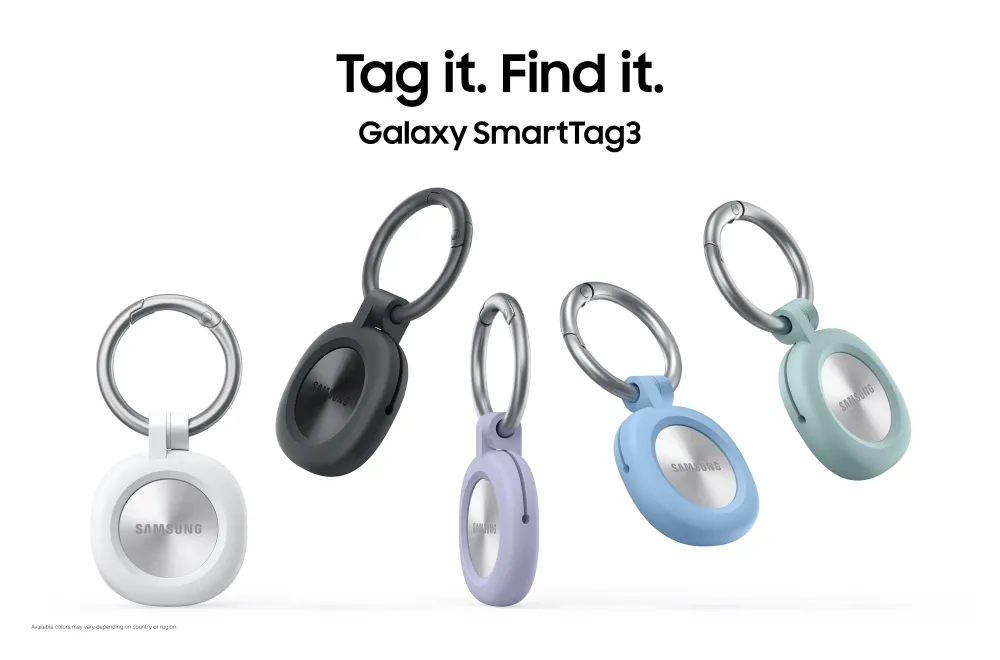
Samsung recently unveiled the Galaxy SmartTag3, and for the first time in the SmartTag lineup, the tracker supports iPhone finding and sharing alongside Galaxy devices. T
The tag itself is about 35% smaller by volume and 33% lighter than the SmartTag2, and Samsung rates the Samsung SmartTag3 battery life at up to 550 days under standard use, stretching to 790 days in Power Saving Mode.
Here's the catch for iPhone owners: Samsung's app on iOS can find a SmartTag3 and accept shared access from a Galaxy owner, but it doesn't feed sightings back into the Galaxy Find Network the way a Galaxy phone does, and the tag still doesn't connect to Google's Android Find Hub.
That distinction matters more for a buying decision than the tag's size or its two colors, White and Black. What follows breaks down exactly what Galaxy owners, iPhone owners, and mixed households can rely on now, and what Samsung still hasn't said.
Galaxy SmartTag3 iPhone support: what works and what's missing
Samsung describes the SmartTag3 as built for "cross-OS compatibility," giving Galaxy and iOS users access to core finding and sharing features from the same physical tag. SmartTag2 catered to Galaxy owners only. SmartTag3 is the first model to open finding and sharing to iPhone users as well.
It helps to separate three things that sound similar but aren't. An iPhone can find a SmartTag3 that's nearby, and it can receive shared access from a Galaxy owner so both people see the same tag's location. What it can't do is contribute a sighting: when an iPhone passes near a tag out of its owner's range, it doesn't update that tag's position in Samsung's network the way a Galaxy device does. Samsung also hasn't spelled out whether an iPhone can register or set up a tag on its own, versus only finding and viewing one a Galaxy device configured first.
Samsung built "Unknown tag alerts" into SmartThings Find in a 2023 announcement to warn Galaxy users about unfamiliar tags following them, but the SmartTag3 materials don't say whether iPhone users get an equivalent warning. Compass View is not an open question: Samsung says the directional-finding feature is not available on iOS.
Multi-device households are part of why this matters. In an earlier Samsung interview about SmartTag2, the company said 23% of SmartTag owners had two or more tags, a figure that had more than doubled from the previous year.
On network reach, Samsung says more than 900 million participating Galaxy devices worldwide can act as anonymous finding nodes, detecting a lost tag and updating its location when a participating device happens to pass nearby, even far from the owner's own phone. Samsung also says SmartTag3 delivers "faster location updates through the Galaxy Find Network," though the press release includes no benchmark or comparison figure.
Because the iPhone app doesn't add sightings to that network, out-of-range recovery for a shared tag still depends on Galaxy device density in the area, not on how many iPhones are nearby. Samsung hasn't said whether that will change.
What Galaxy owners, mixed households, and iPhone-only owners can confirm today
Galaxy owner: Samsung says participating Galaxy devices can detect SmartTag3 and update its location through the Galaxy Find Network. Compass View requires a supported Galaxy device, while Samsung hasn't fully detailed whether every SmartTag2 safety feature, including Unknown tag alerts, carries over unchanged.
Mixed Galaxy/iPhone household: iPhone finding and shared access are confirmed for the first time in the SmartTag line. Samsung says Compass View and Left Behind Alert are not available on iOS, while the launch materials don't specify whether iPhone users receive the same Unknown tag alerts available to Galaxy users.
iPhone-only household: iPhone finding is confirmed. The iPhone doesn't add sightings to the Galaxy Find Network, and SmartTag3 doesn't integrate with Google's Android Find Hub. Recovery outside Bluetooth range still depends on Galaxy device density nearby, not on other iPhones running the app.
Hardware upgrades over SmartTag2, and what's unconfirmed for iOS
Beyond the smaller footprint, Samsung's confirmed hardware upgrade is Bluetooth 6.0 Channel Sounding, which extends Compass View's directional guidance to up to 60 meters under line-of-sight conditions, roughly triple the previous generation's range. Samsung says Compass View is not available on iOS. Bluetooth Channel Sounding currently works on the Galaxy Z Fold8 Ultra, Galaxy Z Fold8, Galaxy S26 Ultra, and Galaxy S26 Plus, with additional devices potentially supported later.
The tag carries an IP67 water and dust resistance rating, matching the SmartTag2's durability standard. On SmartTag2, that IP67 rating applied to lab conditions of up to 1 meter of freshwater for 30 minutes, not pools, beaches, or soapy water, and Samsung noted the resistance can diminish over time.
One SmartTag2 safety feature that mattered for buying decisions, Unknown tag alerts, doesn't appear in Samsung's SmartTag3 announcement. NFC-based Lost Mode does carry over: Samsung explicitly lists it as a retained feature that can display registered contact information or a short message when a lost tag is scanned with a compatible NFC device.
Samsung Galaxy SmartTag3 release date and who should buy now
The Galaxy SmartTag3 release date is set for October 7 in Korea, with the U.S. following and additional markets, including Germany, arriving sometime in 2027. Samsung hasn't announced a U.S. launch date or price yet.
Current SmartTag2 owners are looking at a smaller build, a longer-rated battery, and an extended Compass View range. Those are real upgrades, but nothing here gives owners of a working SmartTag2 a specific reason to replace it before U.S. pricing and a full spec sheet land.
For buyers who need confirmed iOS safety features before committing, some details remain unresolved. Samsung confirms that Compass View and Left Behind Alert are unavailable on iOS, while its launch materials don't spell out whether iPhone users receive Unknown tag alerts or can perform every setup and registration step without a Galaxy device.
Galaxy owners can treat the October 7 Korea launch as the first checkpoint for hands-on details. Anyone weighing SmartTag3 against a SmartTag2 already sitting in a drawer, or an AirTag in an all-Apple household, should verify U.S. pricing and the full iOS feature list before buying.


Comments
Be the first, drop a comment!