





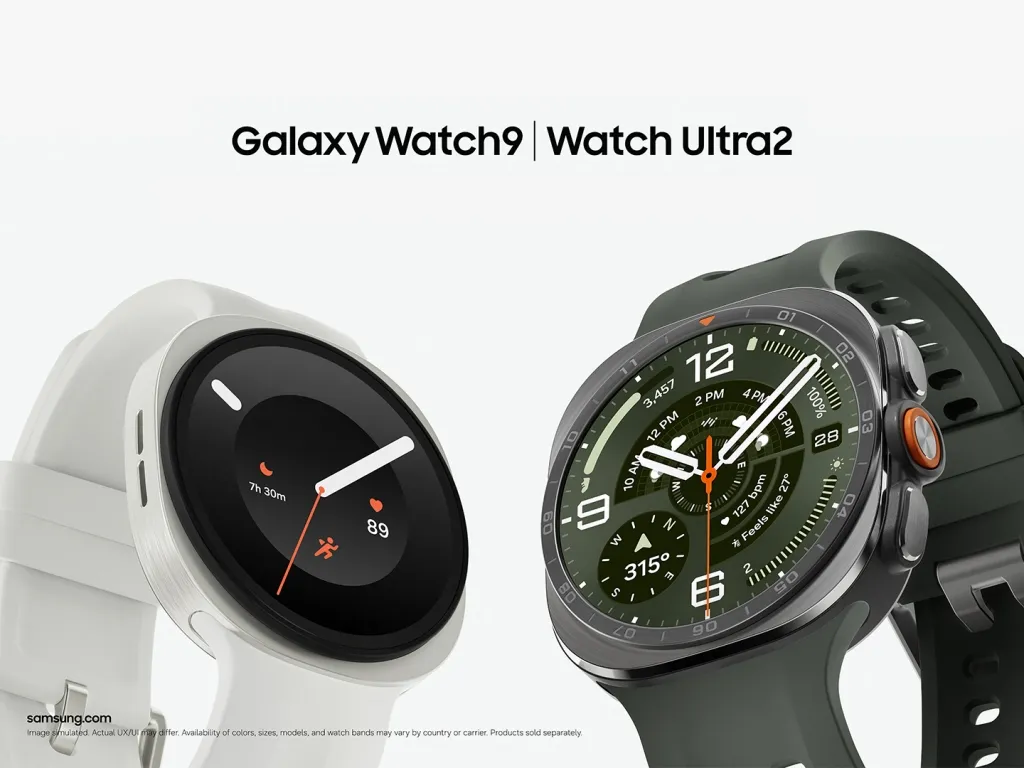
Galaxy Watch 9 owners installing the watch's first firmware update since launch say they didn't have to set the device aside while most of the update installed. Instead, the firmware downloaded and installed in the background while the watch stayed usable, followed by a short restart to switch to the updated software.
The behavior first surfaced through user reports rather than a Samsung announcement. It now appears on both of Samsung's newest watches: the Galaxy Watch 9 and Galaxy Watch Ultra 2 have each received their first post-launch firmware update using the less disruptive installation process.
Availability at a glance:
Galaxy Watch 9: Seamless Updates observed during its first firmware update
Galaxy Watch Ultra 2: Seamless Updates now observed during its first firmware update
Existing Galaxy Watch models: Unlikely to gain the capability through One UI 9 Watch because seamless updating depends on storage partitions configured for the update system
What the Galaxy Watch 9 seamless update changes
The Galaxy Watch 9's first update is roughly 193MB for at least one 44mm Bluetooth variant and carries the August 2026 security patch. Android Authority reports that multiple users saw the firmware install in the background while continuing to use the watch.
That differs from the older Galaxy Watch update process, which can leave the device unavailable while much of the firmware installation takes place.
Seamless Updates don't eliminate downtime entirely. Android's A/B update system installs new software to an inactive set of system partitions while the device continues running from its current software. A restart is still required to boot into the updated version, but most of the lengthy installation happens beforehand.
Samsung didn't list Seamless Updates among the Watch 9's headline specifications or call it out in the update changelog. Its presence became apparent when owners installed the first firmware release.
The reports don't establish whether every watch feature remains available throughout the background installation. In particular, there isn't enough testing yet to confirm uninterrupted behavior for:
Workouts and continuous health tracking
Samsung Wallet payments
LTE calling
Notifications and messaging
Other sensor-dependent features
The watch should remain generally usable while the update installs, but that isn't the same as confirming that every function works without interruption until the final restart.
Why older Galaxy Watches aren't expected to get this
Seamless Updates rely on how a device's system partitions are configured.
Android's A/B update architecture lets a device continue running from its current system slot while an update is written to another slot. After installation, a reboot switches the device to the new software.
Google's Android documentation says A/B updates require system-level changes and recommends implementing them on new devices. That makes this more than a feature Samsung can necessarily add through an ordinary One UI Watch update.
Current reporting therefore indicates that older Galaxy Watches are unlikely to gain Seamless Updates through One UI 9 Watch.
That doesn't mean every detail of Samsung's watch implementation has been publicly documented. Samsung hasn't published a technical support page explaining the partition layout of the Watch 9 or comparing it directly with older Galaxy Watches.
The important distinction is that Seamless Updates depend on underlying device architecture, not simply a new menu option or One UI Watch feature.
Galaxy Watch Ultra 2 also gets seamless updates
The Galaxy Watch Ultra 2 is no longer just a possible candidate.
Its first post-launch firmware update has now started rolling out, and SamMobile reports that the Ultra 2 also installs firmware in the background using Seamless Updates.
The Ultra 2 update is around 200MB depending on the region and variant and carries the August 2026 security patch. A separate rollout report lists firmware version L715USQS1AZH4 for the US SM-L715U model.
That means Samsung's new update architecture isn't limited to the standard Watch 9. Both watches Samsung launched with One UI 9 Watch now show the same less disruptive update behavior.
Rollout timing still varies. The Watch 9 update appeared first in South Korea, while the Ultra 2's first update began appearing on US models before expanding elsewhere.
So an owner who doesn't see the update immediately shouldn't assume their watch lacks Seamless Updates.
What the first updates actually prove
The first firmware rollouts establish that the Galaxy Watch 9 and Galaxy Watch Ultra 2 can install most of an OTA update in the background while remaining usable.
They also establish that a restart is still part of the process. Seamless doesn't mean restart-free; it means most of the installation happens while the existing system is still running.
One round of updates doesn't establish exactly how every future firmware release will behave. A much larger One UI Watch upgrade could take longer to prepare in the background than a roughly 200MB security patch.
It also doesn't establish uninterrupted operation of every individual watch feature during installation.
The broader mechanism is well established in Android. Google's A/B documentation says users can continue using a device while an OTA is written to the inactive system slot, with the new software taking over after a reboot.
What remains specific to Samsung's watches is how that process affects features such as workouts, health sensors, LTE calls, payments, and notifications while an update is actively being prepared.
What to watch for during the next update
The next Watch 9 or Ultra 2 firmware release should make the experience easier to characterize.
Useful things to check include:
Whether the watch remains responsive throughout the background installation
Whether notifications continue arriving normally
Whether an active workout keeps recording
Whether LTE calling remains available
Whether Samsung Wallet stays usable
How long the final restart takes
Whether larger feature updates behave differently from small security patches
Those functions haven't all been independently tested during the new update process.
What Watch 9 and Ultra 2 owners should do now
Galaxy Watch 9 and Galaxy Watch Ultra 2 owners can check for firmware through the Galaxy Wearable app under Watch settings > Watch software update > Download and install.
There's no reason to delay a security update just to test the new installation system. The main practical benefit is that the watch should remain available through most of the update instead of spending the entire installation period offline.
Owners of older Galaxy Watches shouldn't expect One UI 9 Watch alone to add the same behavior. Seamless Updates depend on underlying system architecture that normally has to be established when the device is built.
For the Watch 9 and Ultra 2, the remaining question isn't whether Seamless Updates exist anymore. Both have now demonstrated the capability. The next question is how consistently Samsung's implementation keeps individual watch functions available across larger firmware releases.











Comments
Be the first, drop a comment!