Header Banner
Gadget Hacks Logo
Gadget Hacks
Samsung
gadgethacks.mark.png
Gadget Hacks Shop Apple Guides Android Guides iPhone Guides Mac Guides Pixel Guides Samsung Guides Tweaks & Hacks Privacy & Security Productivity Hacks Movies & TV Smartphone Gaming Music & Audio Travel Tips Videography Tips Chat Apps
Home
Samsung

One UI 9 Motion Photo Wallpaper: Which Phones Support It

One UI 9 Motion Photo Wallpaper: Which Phones Support It

Samsung's One UI 9 update now lets Galaxy owners turn a Motion Photo into an animated home or lock screen wallpaper, giving a years-old camera feature a new use. Android Authority reports that One UI 9.0 allows Motion Photo images to be applied to the home screen, the lock screen, or both, a change first spotted by SamMobile.

The setup runs through the Gallery app and includes a live preview along with a toggle to switch the animation on or off (SamMobile).

Availability is uneven, though. The feature is confirmed on Samsung's newest foldables, but SamMobile did not find the option on its own Galaxy S26 Ultra running One UI 9.0 Beta 5 (SamMobile). Running One UI 9 does not automatically mean a phone has this particular option.

What follows covers how the feature works, which phones have it right now, and what still hasn't been settled about a wider rollout.

What is a Samsung Motion Photo?

A Motion Photo is a camera mode that captures a few seconds of action leading up to the moment the shutter is released. Once the picture is taken, a clip of roughly three seconds gets saved alongside it (Android Authority).

The original point of that clip was practical: it let people scrub through the action and pick the exact instant to keep as a still frame, rather than settling for whatever the sensor caught at the precise second the button was pressed (Android Authority).

One UI 9 gives that same clip a second job. Instead of treating it purely as a frame-picking tool, the software can now use the saved Motion Photo animation as a home or lock screen wallpaper (Android Authority).

How to set a Motion Photo as wallpaper on One UI 9

The process mirrors setting any other wallpaper. Inside the Gallery app, any image that has a Motion Photo attached can be applied to the home screen, the lock screen, or both (SamMobile).

Before confirming, the phone shows a preview of how the animation will look in place, whether that's a Galaxy Motion Photo home screen wallpaper or a lock screen version (SamMobile). SamMobile describes the flow as working similarly to setting a normal, static wallpaper, just with an extra option layered on top (SamMobile).

That extra option is a dedicated Motion Photo button, which enables or disables the animation without requiring a different image to be chosen (Android Authority). Someone who likes the composition of a shot but not the movement behind it can keep the still and switch the animation off with a single tap.

Confirmed devices, and the Galaxy S26 beta gap

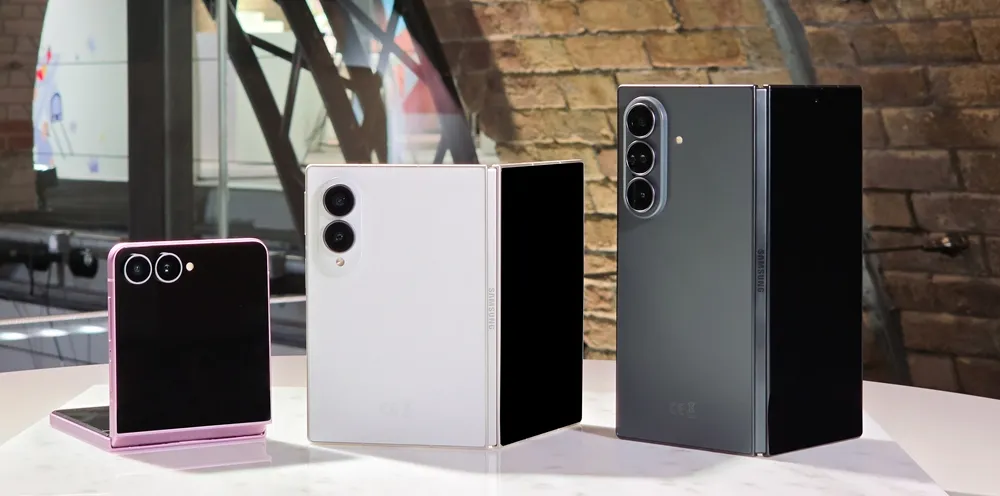
Three devices currently support the feature: the Galaxy Z Flip 8, Galaxy Z Fold 8, and Galaxy Z Fold 8 Ultra, all running One UI 9 (SamMobile). One UI 9 debuted with that Flip 8 and Fold 8 lineup, and SamMobile describes it as an incremental update rather than a major overhaul compared with One UI 8.5 (SamMobile).

SamMobile did not find the option on its Galaxy S26 Ultra running One UI 9.0 Beta 5 (SamMobile). Android Authority reported SamMobile's finding, adding its own observation that the feature has not yet surfaced on Galaxy S26 devices running the One UI 9.0 beta more broadly (Android Authority).

That leaves an open question rather than a closed one. SamMobile notes the Motion Photo wallpaper option "could arrive with the stable update in the future" for Galaxy S26 devices, language that treats a rollout as possible without promising one (SamMobile). That caveat applies specifically to the S26 line running beta software. Samsung has not said anything, one way or another, about whether other One UI 9 devices will pick up the feature down the line.

Other wallpaper changes in One UI 9

Motion Photo wallpapers arrive alongside a smaller, confirmed change to cover-screen wallpapers. Samsung's own One UI 9 page describes an automatic positioning system that keeps the clock and widgets from overlapping key parts of a cover-screen photo, with a manual drag option available if the automatic placement misses (Samsung US, last month).

That fits the broader framing Samsung used when it opened the One UI 9 beta program to Galaxy S26 users three months ago, describing the update around expanded creative tools and customization options alongside accessibility and security work (Samsung Global Newsroom, three months ago). Samsung's materials don't name Motion Photo wallpapers specifically, but the stated direction, more personalization options built into existing software, lines up with what shipped.

Two other Samsung developments touch on wallpapers but sit apart from this particular feature. SamMobile got an early look at a redesigned SmartThings app that is not yet released, which may include a home screen background that shifts color by time of day and supports a different custom wallpaper for each saved location, alongside nine preloaded live wallpaper options (SamMobile, two weeks ago). The app's design matches One UI 9's visual language, and SamMobile expects it to arrive after the stable One UI 9.0 rollout begins, though no release date has been set. It is a separate app update, and Samsung has not linked it to Motion Photo wallpapers.

Separately, leaked Galaxy S26 FE firmware contains a banner asset referencing One UI 9.5 in the software update menu, using a design of three curved pink lines rather than the circular pattern tied to One UI 9 (SamMobile, two weeks ago). SamMobile is explicit that the banner does not mean the S26 FE will launch with One UI 9.5; Samsung routinely plants assets for future software versions inside current firmware well before they ship. The outlet expects the S26 FE, which could be unveiled in late August or early September this year, to launch on One UI 9, with version 9.5 more likely tied to the Galaxy S27 lineup in 2027, or possibly a beta program for existing devices later this year. None of that establishes a timeline for Motion Photo wallpapers reaching other devices.

Where things stand

Samsung has said the "full" One UI 9 experience, including more advanced AI features, is coming to additional flagship devices later this year, but that announcement doesn't mention Motion Photo wallpapers specifically (Samsung Global Newsroom, three months ago). Whether that expansion carries the wallpaper feature with it, or whether it lands separately through a future stable update for S26 devices, is not something Samsung has addressed. For now, the Flip 8 and Fold 8 lineup is the only confirmed place to try it.

Apple's iOS 26 and iPadOS 26 updates are packed with new features, and you can try them before almost everyone else. First, check our list of supported iPhone and iPad models, then follow our step-by-step guide to install the iOS/iPadOS 26 beta — no paid developer account required.

Sponsored

Related Articles

Comments

No Comments Exist

Be the first, drop a comment!